Preview (WebP). Download the PDF for print.
Coding agents · Cursor vs Claude Code
We need an AI IDE - buy Cursor?
Same job, different room…
A2 · 420 × 594 mm · print-first
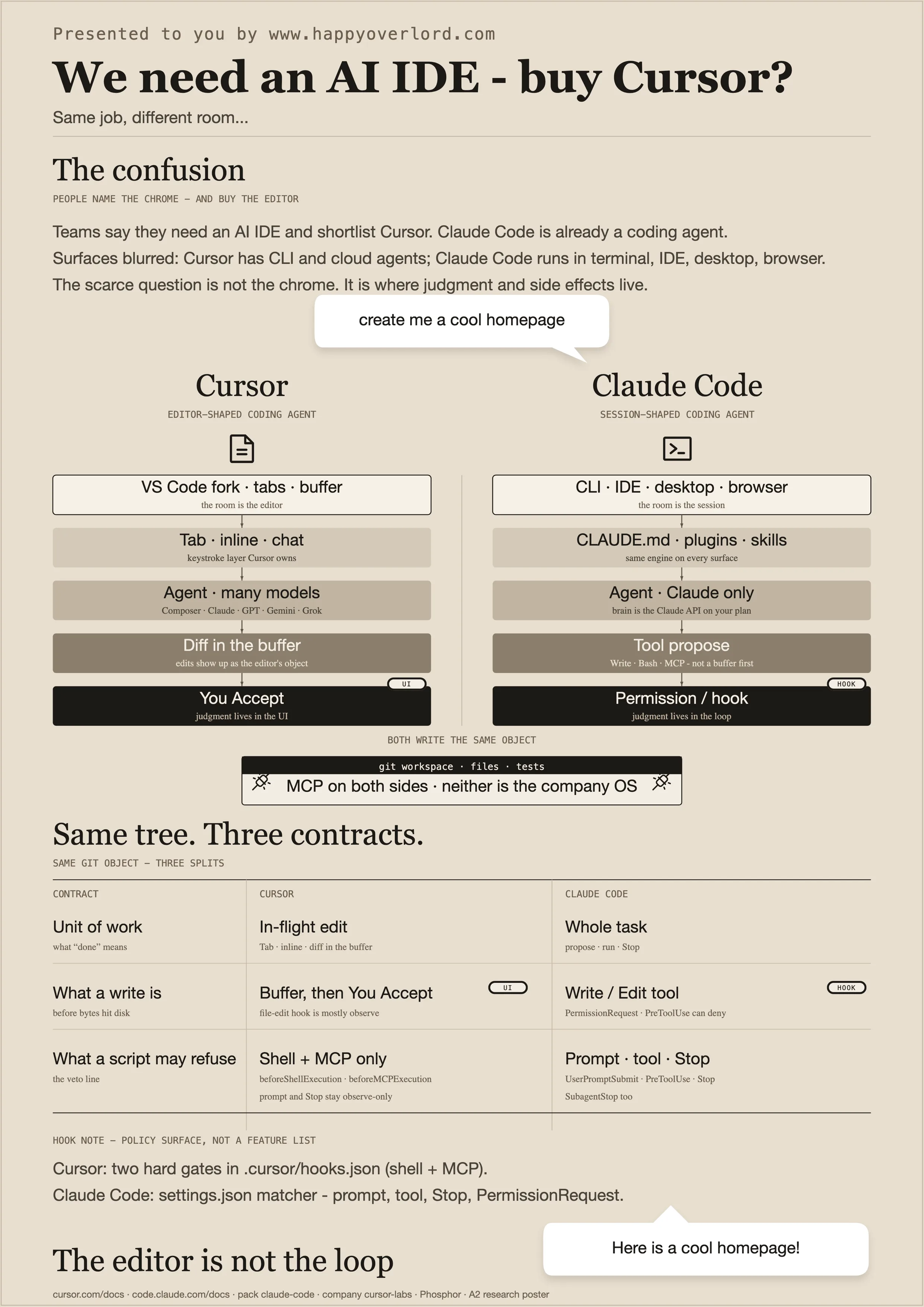
This poster splits two coding agents that get sold as rivals: Cursor (editor-shaped) and Claude Code (session-shaped). Both write the same git tree. Both speak MCP. Neither is the company OS. The scarce distinction is where a human — or a hook — is allowed to say no.
The headline is the common mistake — “we need an AI IDE, so buy Cursor.” Claude Code is already a Coding Agents loop: tools, permissions, files. Cursor is an IDE with an agent inside it (and now a CLI and cloud agents too). Related packs: Claude Code, Aider, Continue. Taxonomy: Tool Integration, Guardrails, Code Sandbox.
The confusion
People name the chrome — and buy the editor
Teams shortlist Cursor because they want an AI IDE. That shopping list is about chrome: tabs, Tab autocomplete, diffs in the buffer. The job underneath is still “an agent changes this repository.”
Surfaces have blurred. Cursor ships CLI and cloud agents. Claude Code runs in the terminal, inside other editors, on desktop, and in the browser. Do not treat the install icon as the architecture.
- Cursor = editor-shaped coding agent
- Claude Code = session-shaped coding agent
- Same job: write the tree
Cursor
The room is the editor — judgment in Accept
Cursor is a VS Code fork. Tab, inline edit, and chat are the keystroke layer it owns. The agent multiplexes models (Composer plus Claude, GPT, Gemini, Grok). Edits arrive as diffs in the buffer.
The human gate is the UI: you Accept. Hooks exist (.cursor/hooks.json) but only two events can block — shell and MCP. File edits and stop are mostly observe. See Guardrails.
- VS Code fork · Tab · many models
- Diff in the buffer → You Accept
- Hard hooks: beforeShellExecution · beforeMCPExecution
Claude Code
The room is the session — judgment in the loop
Claude Code is Anthropic’s agentic coding tool: CLI first, same engine in IDE, desktop, and browser. Instructions live in CLAUDE.md, plugins, and skills. The brain is Claude only (Claude Code / Claude API on your plan).
The agent proposes tools (Write, Bash, MCP). PermissionRequest and PreToolUse sit in front of the side effect. Stop can refuse. That is the loop shown on the sibling poster What happens next….
- CLI · IDE · desktop · browser
- Tool propose → PermissionRequest → PreToolUse
- Claude only — not a model supermarket
Same tree. Three contracts.
Same git object — three splits
Do not restack the homepage path. The scarce remaining splits are contracts, not chrome.
Unit of work: Cursor ships an in-flight edit (Tab, inline, diff). Claude Code ships a whole task (propose, run, Stop). What a write is: on Cursor the bytes sit in the buffer until You Accept, and a file-edit hook is mostly observe; on Claude Code a write is a Write/Edit tool call that PermissionRequest and PreToolUse can deny before disk. What a script may refuse: Cursor hard-gates shell and MCP only; Claude Code can refuse the prompt, the tool, Stop, and SubagentStop.
MCP is on both sides. That does not make either product a ledger or an approval authority. Pair with Tool calling and Agents vs workflows when the question is “who may run this.”
The editor is not the loop
Do not buy chrome and call it policy
Closing line only. If you need keystroke autocomplete, you are shopping for an editor. If you need a gated tool loop you can script, you are shopping for a session agent. You can run both — Claude Code’s extension even installs inside Cursor.
Read the two stacks as rooms, not scorecards. Read black as “the human or the hook just decided.” That is the whole argument the poster is defending on one A2 sheet.
Sources
- cursor.com/docs
- code.claude.com/docs
- pack claude-code
- company cursor-labs
- Phosphor icons
Propose a topic
Suggest the next AI infographic. One topic, one glance — what should it make obvious?