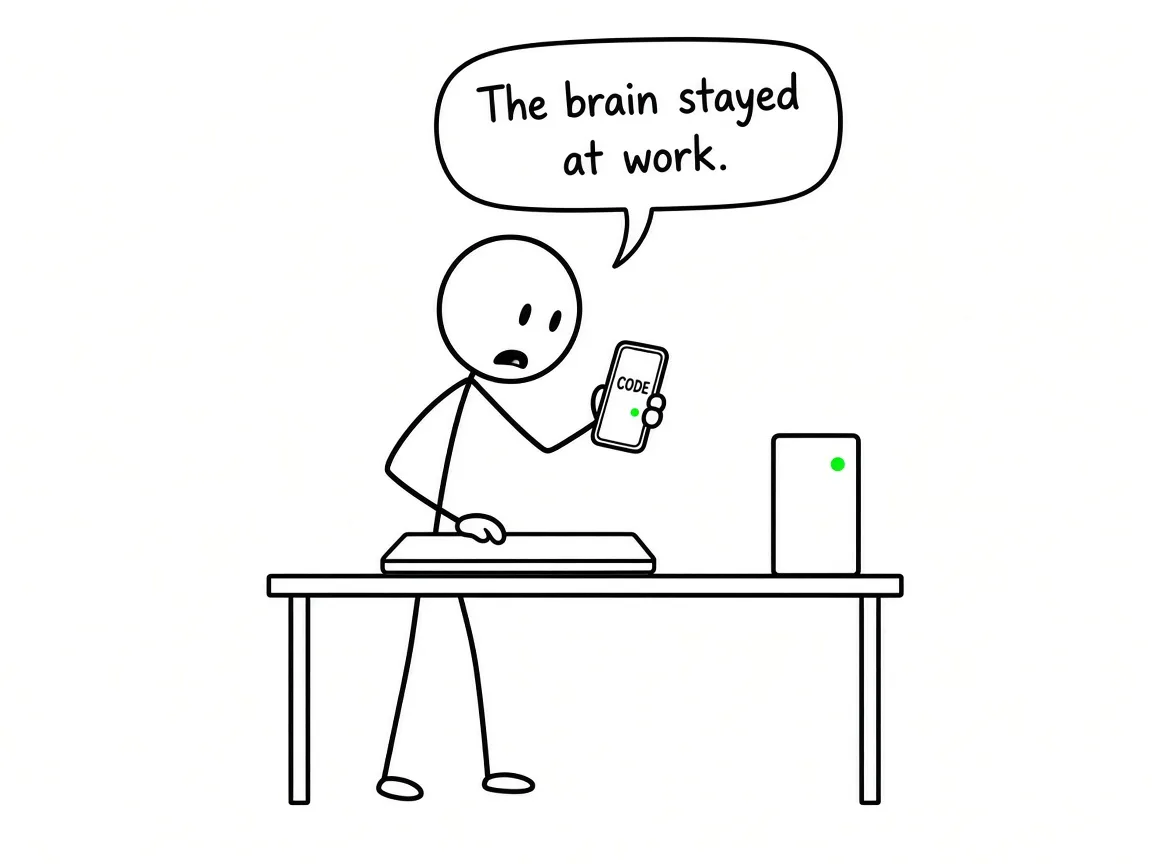
Claude Code on a laptop is fine until the laptop stops being a server. Then the session, the database, the MCP sockets, and the half-finished migration all go dark with the lid.
The notebook is the runtime, not a client. Sleep, travel, and “I’ll just close this” end the process that holds the tools and the filesystem. Anthropic’s own mobile docs say it bluntly: Remote Control and Dispatch drive your machine — if that machine is off, use cloud sessions instead. Local-only stacks make it worse. A MAMP MySQL on localhost:8888, a desktop MCP, a path under /Users/… — none of that exists once you walk away. Git may be clean; the environment is not. You also stay glued to the keyboard for approvals and steering. We already named that trap when we talked about messaging gateways:
Channels: you message from the phone; the agent answers in WhatsApp, Telegram, Signal, iMessage, Slack, Discord, Teams, Matrix, and the rest of their list. Claude Code stays at the keyboard.
— from OpenClaw when you already have Claude (or Claude Code)
OpenClaw solves the chat front door. It does not move your repo runtime. For coding, the scarce move is different: server = brain, devices = clients.
Two different products share the claude.ai/code UI. Claude Code on the web runs on Anthropic-managed infrastructure. Remote Control runs on a machine you control — local MCP, local files, your Docker — while phone and browser are windows into that session. Docs: Remote Control · Claude Code on mobile.
Remote Control needs a claude.ai subscription login (claude → /login). API keys alone fail. It is not available on Bedrock, Google Agent Platform, Microsoft Foundry, or when ANTHROPIC_BASE_URL points at a gateway such as LiteLLM instead of api.anthropic.com. Networking is outbound HTTPS only — no inbound ports on your box. Transcripts for the remote UI are stored on Anthropic’s side while connected; execution stays on the machine. Research preview; Team/Enterprise often off until an Owner flips it.
Invocation examples from the docs:
# server mode — waits for phone/browser
claude remote-control

# interactive local session also reachable remotely
claude --remote-control

# inside an existing session
/remote-control
Connect with the session URL, the QR code (spacebar in server mode), or the Code tab in the Claude app — green computer icon when online.
Because “your machine” still has to stay awake. A laptop on Remote Control is a remote UI over a sleeping host. An always-on Linux VPS (or a Mini that never sleeps) is the honest host for twenty-four-seven work. Pattern we run:
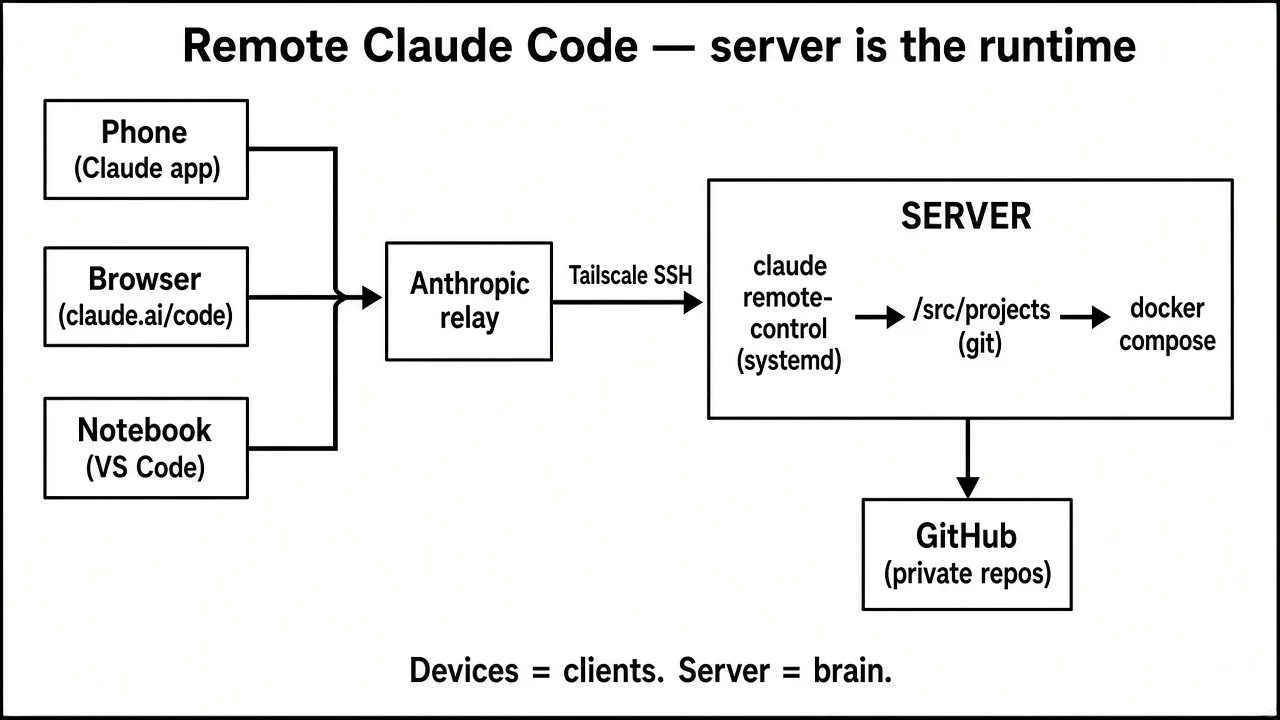
- Host: Claude Code + projects under
/srv/projects, Docker Compose for apps/DBs, systemd user unit forclaude remote-control,loginctl enable-lingerso it survives logout. - Private admin: Tailscale + Tailscale SSH; UFW default deny; container ports bound to
127.0.0.1only. - Source of truth: private GitHub — nothing that exists only on one disk.
- Auth: Pro/Max (or eligible plan) on the server — not an API key for Remote Control.
- Clients: phone/browser → Anthropic relay → Remote Control; notebook → Tailscale SSH → VS Code Remote-SSH + Claude Code extension “Install in SSH”.
Example systemd user unit (verify flags with a logged-in claude remote-control --help — the surface moves):
[Unit]
Description=Claude Code Remote Control
After=network-online.target

[Service]
WorkingDirectory=/srv/projects
ExecStart=%h/.npm-global/bin/claude remote-control
Restart=always
RestartSec=10
Environment=PATH=%h/.npm-global/bin:/usr/local/bin:/usr/bin:/bin

[Install]
WantedBy=default.target
systemctl --user enable --now claude-rc
sudo loginctl enable-linger "$USER"
Honest friction: Remote Control’s TUI wants a terminal. Community systemd kits hit workspace-trust prompts and noisy journals — see Anthropic issues 30447 and 53606. Warm trust interactively once; use resume flags when your CLI has them.
Every active repo under /srv/projects/<PROJECT> gets a project CLAUDE instructions file, Claude Code project settings, a Compose file, .env (gitignored), .env.example (committed). Remote sessions cannot lean on unrestricted permission bypass the way a local toy might — pre-approve the boring tools, deny the dangerous ones, let the rest pause for a push notification.
{
  "permissions": {
    "allow": [
      "Read", "Edit", "Write",
      "Bash(git status)",
      "Bash(git diff:*)",
      "Bash(git add:*)",
      "Bash(git commit:*)",
      "Bash(git push)",
      "Bash(docker compose:*)",
      "Bash(npm run:*)",
      "Bash(npm test:*)"
    ],
    "deny": [
      "Bash(git push --force:*)",
      "Bash(rm -rf:*)",
      "Bash(docker system prune:*)",
      "Read(./.env)"
    ]
  }
}
Compose pattern — never publish Postgres to the world:
services:
  app:
    build: .
    env_file: .env
    ports:
      - "127.0.0.1:3000:3000"
    depends_on: [db]
    restart: unless-stopped
  db:
    image: postgres:16
    env_file: .env
    volumes: [db_data:/var/lib/postgresql/data]
    ports:
      - "127.0.0.1:5432:5432"
    restart: unless-stopped
volumes:
  db_data:
Migrating from a local MAMP world: push a private repo, clone on the server, replace MAMP with Compose (pin the PHP/MySQL versions you actually used), move secrets with scp over Tailscale — never git — dump/restore the DB, rewrite hardcoded localhost:8888 into env vars, add a project CLAUDE instructions file + settings, then prove the loop with the notebook off. Parallel work = one git worktree per Remote Control session, not five agents fighting one working tree.
Refuse Remote Control when Zero Data Retention forbids Anthropic transcript sync, when you must stay on Bedrock or a custom ANTHROPIC_BASE_URL, or when cloud GitHub sandbox with no local tools is enough — use Claude Code on the web. Happy only for a named gap (voice, self-hosted relay). OpenClaw for WhatsApp/Telegram — not for “repo still running after the lid closes.” Keep Claude API as the brain; Claude Code as the coding agent; host that does not sleep.
Done means: unit active, green device card, phone session commits, VS Code over Tailscale works, notebook closed still works, reboot brings the stack back.
A new box in its own Hetzner Cloud project (Claude Code), not the shared multi-site server. Wireframe of the create sidebar I confirmed before Create & Buy now — ON left, OFF right, €10.70 / mo total:
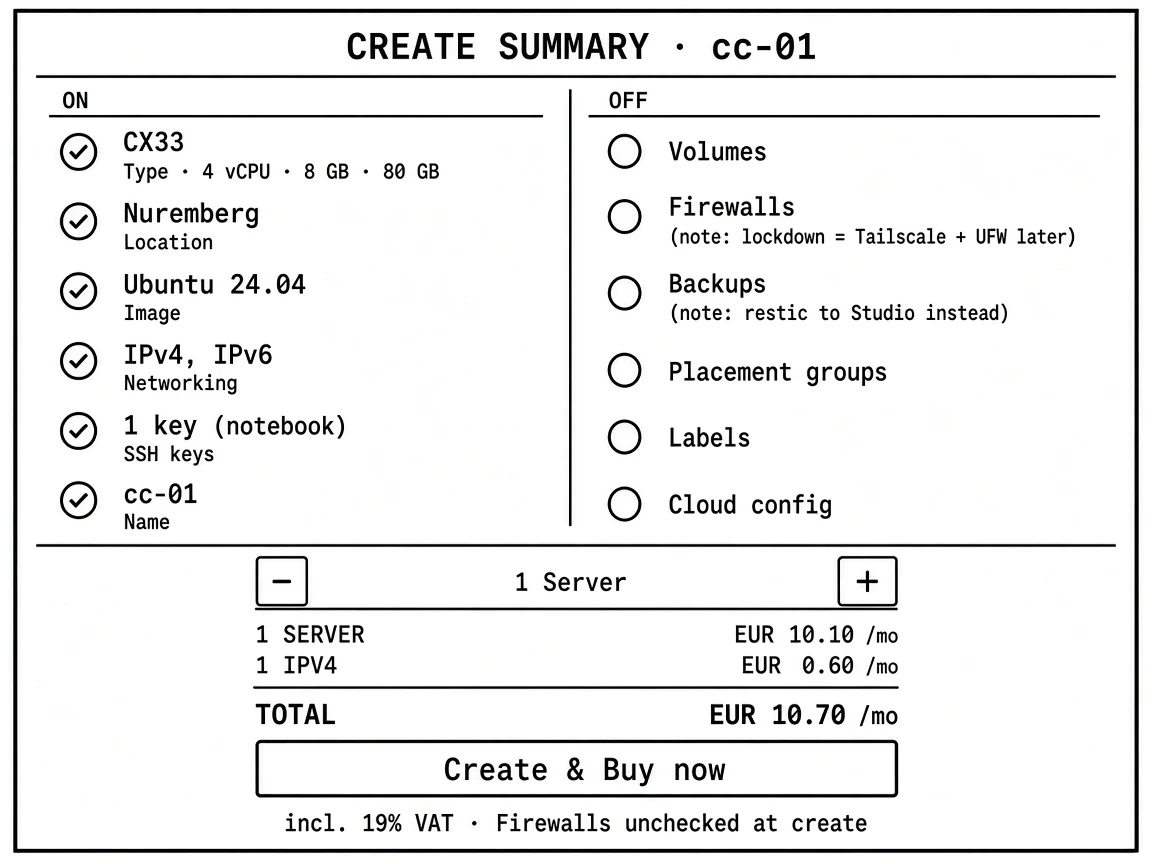
If that sidebar ever shows CPX prices, stop — wrong SKU. Minimum viable is CX23; CPX only if CX is out of stock everywhere. Hetzner’s June twenty twenty-six list (price adjustment): CX33 about eight forty-nine net before VAT; GmbH cares about the net line. Billing is hourly. Never rescale the shared legacy box onto new list prices.
What I did, in order:
- Console: new project, add the notebook’s ed25519 key as default. Cloud Firewall is optional at create — this order left Firewalls unchecked; lockdown is Tailscale + UFW on the host (temporary public SSH only until Tailscale works).
- Create
cc-01with that key. First login as root; packages, unattended upgrades, Europe/Berlin, hostnamecc-01, non-root sudo user, copy authorized keys, four-gigabyte swap (buffer for builds). - Install Tailscale with SSH (
tailscale up --ssh --hostname=cc-01), approve the machine, disable key expiry. Prove Tailscale SSH tocc-01before lockdown. - UFW: default deny inbound, allow only on the Tailscale interface. SSH: password and root login off. Remove the Hetzner inbound twenty-two rule so public inbound is empty. Recovery if locked out: Hetzner web console or Rescue.
- As the user: Node twenty-two, global Claude Code, subscription login (not an API key). Docker via the official install script; user in the docker group (acceptable only because admin is Tailscale-only); log rotation capped.
- Layout:
/srv/projects, worktrees,/srv/data/dumps. Server deploy key to the private GitHub org. Clone only active projects. Client data not on this box by default. - systemd user unit for
claude remote-control, linger enabled — device cardcc-01in the Claude app Code tab. - Backups: restic over Tailscale to the Mac Studio (Remote Login on, disk that does not sleep), nightly database dumps plus
/srvand Claude config, fourteen-day dump retention, restic keep-daily fourteen / weekly eight / monthly six. Hetzner snapshots intentionally unused. One restore test is mandatory; full rebuild from restic plus git is about an hour.
Do-not: no agents on the shared box; no public ports on cc-01 (port-forward instead); no secrets or restic password in git; no client corpora without a contract check.
Done on Hetzner: still CX33 in console, public SSH fails, Tailscale works, claude-rc green in the app, phone commits, VS Code Remote-SSH opens a project, restic has snapshots, reboot survives, notebook closed still works.
Good. Server stays up. Clients come and go.